Gemini 101: The Business Leader's Guide to Google's AI
Rashad Cureton
Founder, Cure Consulting Group
What Is Gemini — and What Makes It Different?
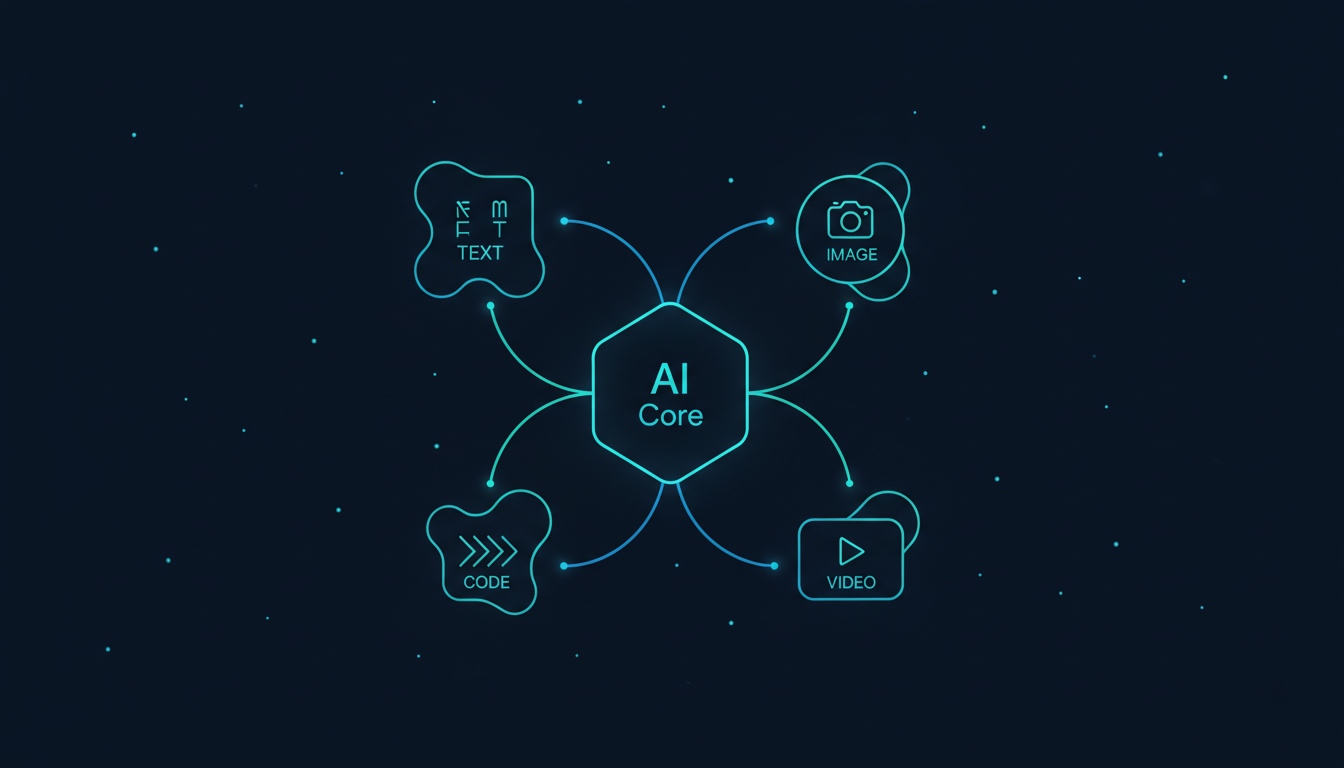
Gemini is Google DeepMind's flagship AI model family, and it represents a fundamentally different approach to building AI. While most models were designed as text-first systems that had image and audio capabilities bolted on later, Gemini was natively multimodal from day one — trained simultaneously on text, images, audio, video, and code.
This isn't a marketing distinction. It means Gemini doesn't "translate" an image into text to understand it. It processes visual, auditory, and textual information together, the way a human brain does. For businesses dealing with diverse content types, this changes everything.
Gemini Multimodal Architecture
Gemini's Model Lineup
Google offers three tiers optimized for different performance-cost tradeoffs:
| Model | Speed | Intelligence | Best For | Cost (per 1M input tokens) |
|---|---|---|---|---|
| Flash | Fastest | Good | High-volume tasks, summarization, classification | Free tier available / $0.075 |
| Pro | Fast | Very Good | Complex reasoning, multimodal analysis, long context | $1.25 - $7.00 |
| Ultra | Moderate | Best-in-class | Research-grade tasks, advanced scientific reasoning | Enterprise pricing |
Where Gemini Excels for Business
Having integrated Gemini across several client projects — including Firebase backends for Vendly and media workflows for TwntyHoops — here's where it consistently delivers the most value:
1. Multimodal Content Analysis
Feed Gemini a product photo and it extracts details, suggests descriptions, and identifies issues. Upload a video and it generates timestamped summaries. This isn't a separate vision model — it's the same model understanding everything in context.
2. Google Workspace Integration
Gemini lives inside the tools your team already uses. It can draft emails in Gmail, create formulas in Sheets, generate presentations in Slides, summarize meetings in Meet, and organize documents in Drive. No API setup, no integration work — it's just there.
3. Search-Grounded Responses
When you need AI that knows what happened yesterday — stock prices, competitor announcements, regulatory changes — Gemini's grounding with Google Search delivers answers with citations, not guesses.
4. Data Analysis at Scale
Connect Gemini to BigQuery and it becomes an analyst that speaks SQL and plain English. Marketing teams can query millions of rows of customer data by describing what they want in natural language.
5. Video and Image Understanding
Marketing teams can upload competitor ads, product photos, or social media content and get instant analysis — brand consistency checks, sentiment analysis, or creative brief extraction — all from visual content.
The future of AI isn't text-in, text-out. It's everything-in, everything-out. Gemini is the first model that was built from the ground up for that reality.
”Gemini Multimodal Pipeline
Get insights like this in your inbox
Practical tips on AI, mobile & cloud — no spam.
Getting Started: Gemini in Your Organization
Audit Your Google Footprint
If your team runs on Google Workspace, you already have a distribution channel. Identify the Workspace tools your team uses most — that's where Gemini integration will have the fastest adoption.
Enable Gemini in Workspace
Activate Gemini for your Google Workspace subscription. Start with a pilot group of 5-10 power users in marketing, sales, or operations. Let them explore Gemini in Gmail, Docs, and Sheets for two weeks.
Identify Multimodal Workflows
Look for processes that involve multiple content types — reviewing images and writing descriptions, watching videos and creating summaries, analyzing PDFs and generating reports. These are Gemini's sweet spot.
Prototype with AI Studio
Use Google AI Studio (free) to test Gemini API calls before committing to Vertex AI. Build a proof of concept for your highest-value multimodal workflow in a single afternoon.
Scale with Vertex AI
For production workloads, deploy through Vertex AI for enterprise-grade reliability, custom model tuning, and integration with your existing Google Cloud infrastructure.
Sample Integration
Here's a multimodal Gemini API call using the Google GenAI SDK:
import google.generativeai as genai

genai.configure(api_key="your-api-key")

model = genai.GenerativeModel("gemini-2.5-pro")

# Upload an image and ask about it
image = genai.upload_file("product-photo.jpg")

response = model.generate_content([
    "Analyze this product photo. Identify the product category, "
    "suggest 3 SEO-optimized titles, and flag any quality issues.",
    image
])

print(response.text)
Gemini Flash (Free / Low Cost)
- Blazing fast responses (sub-second)
- Free tier in AI Studio (rate limited)
- Great for classification, routing, summarization
- 1M token context window
- Best cost-to-performance ratio in the market
Gemini Pro (Mid-Range)
- Full multimodal capabilities
- 2M+ token context window
- Grounding with Google Search
- Advanced reasoning and coding
- Ideal for most business applications
Gemini Ultra (Enterprise)
- State-of-the-art performance
- Research-grade capabilities
- Custom deployment options
- Dedicated support and SLAs
- For the most demanding use cases
When to Choose Gemini
Choose Gemini when:
- Your business runs on Google Workspace (Docs, Sheets, Gmail, Meet)
- You process diverse content types (images, videos, PDFs, audio)
- You need AI responses grounded in real-time search data
- Your data lives in Google Cloud (BigQuery, Cloud Storage)
- You want the longest context window available (2M+ tokens)
Consider alternatives when:
- You need the absolute best reasoning on complex analytical tasks
- Your infrastructure is built on Azure or AWS
- You need the strongest safety guardrails for regulated industries
- Your team relies on an established plugin/extension ecosystem
Running your business on Google and wondering how to add AI? Book a free consultation — we'll map your Workspace workflows and identify the fastest path to Gemini integration.
Written by
Rashad Cureton
Founder & Principal Engineer
Rashad is the founder of Cure Consulting Group. Previously an engineer at JP Morgan, Ford, Clear, NYT, Kickstarter, and Big Nerd Ranch. He builds full-stack web and mobile apps for startups and companies of every size.
Related Articles
Claude vs. Gemini vs. GPT: An Honest Comparison for Business Leaders (2026)
We use all three AI platforms at Cure Consulting — here's an honest, experience-based breakdown of when to use Claude, Gemini, or GPT for real business tasks. No vendor hype, just what actually works.
12 min
GPT 101: The Business Leader's Guide to OpenAI's AI
GPT and ChatGPT aren't just the most popular AI — they've built the largest ecosystem of plugins, custom bots, and enterprise integrations in the industry. Here's how to leverage OpenAI's platform for your business.
10 min
How Much a Token Costs: The Real Price of AI Adoption
A single AI token costs a fraction of a penny. So why do most companies spend six figures getting AI into production? A closer look at the gap between the price tag and the bill.
11 min